


Loopit - Make Playables
4.84.97K Reviews
App Specs
- Version
- 1.3.50
- Updated On
- License
- Free
- Downloads
- 5,000,000+
- Developer
- SeedLeap Intelligent Technology Co., Ltd.
- Categories
- Entertainment
- Platform
- Android
Screenshots
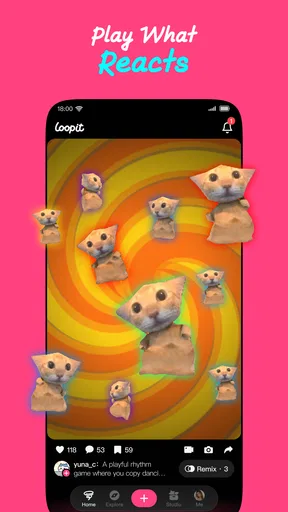
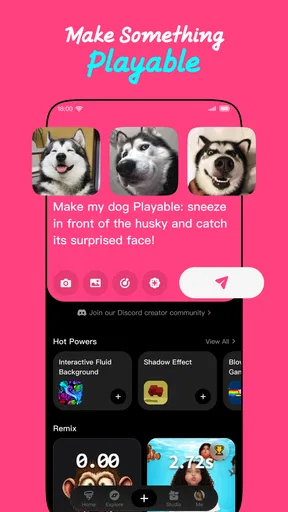
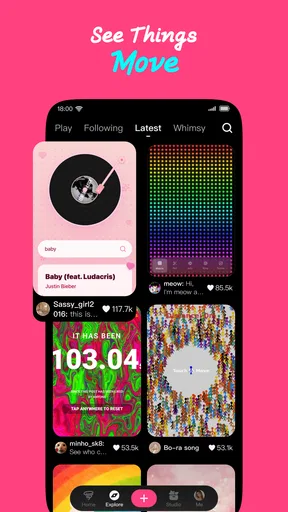
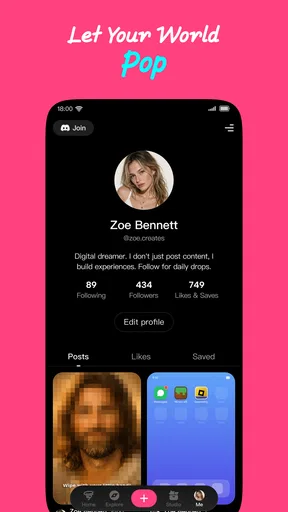
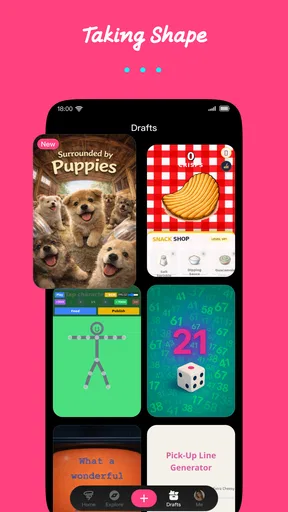
 Analysis by AppCompare
My main impression of Loopit is that it makes a playful kind of creation feel approachable: you can explore the idea of making something interactive without first treating your phone like a programming workstation. That focus gives Loopit - Make Playables a clear identity among entertainment apps. I’d recommend it most to curious people who enjoy experimenting, remixing ideas and sharing small creative projects—not to someone who needs a full game-development suite or a guaranteed, polished result in minutes.
A creative tool with a low-pressure starting point
There’s a useful distinction between playing a game and making something someone else can play. Loopit is aimed at that second activity, with room for experiments that might take the form of a joke, a visual interaction, a tiny challenge or a playful scene. I find that framing more inviting than starting with a blank page and a technical manual. It encourages you to think, “What would be fun to tap or try?” rather than “What do I need to learn before I can begin?”
That makes the app a good fit for brief creative sessions. You might have an idea while waiting for a friend, sketch out a rough interaction during a quiet break, then return later to refine it. The benefit is not only the finished piece; it’s the chance to test whether an idea works as an experience. If the interaction is confusing or the joke doesn’t land, a small project is easier to rethink than a large one.
Why the remix angle matters
Remixing can be a more practical entry point than inventing everything from scratch. When you encounter a playful idea, you can consider what to change: its subject, tone, sequence or intended audience. That simple habit is useful for learning creative judgment. Instead of asking only whether you can make something, you start asking what makes an interaction satisfying and how a small adjustment changes the result.
I’d use that approach deliberately: first make a version that works at a basic level, then change one thing at a time. If you adjust the idea, wording and interaction all together, it becomes harder to tell which change improved it. A focused remix keeps the experiment understandable, and it’s a sensible way to build confidence before attempting a more personal concept.
Loopit is an entertainment app from SeedLeap Intelligent Technology Co., Ltd. It is free, carries an Everyone age rating and has reached over a million installs, with a 4.7 average from around 23,000 ratings. Those figures suggest broad interest, but I would treat them as context rather than proof that every creator will enjoy the process. The best test is whether you like thinking in small, interactive ideas.
Unleashing Creativity with Ease
So, what’s the deal with Loopit - Make Playables? Well, it’s all about creating interactive playables. Imagine being able to craft mini-games or interactive content with just a few taps on your phone. Sounds intriguing, right? This app has managed to blend simplicity with powerful creative tools, making it accessible for anyone who wants to dip their toes into the world of playable content creation.
Worth Reading Before You Choose

EA SPORTS FC Mobile 26 Is a Bigger Football Game, but It Takes Time

Flipboard Shows What News Apps Must Do Beyond the Feed

Switching to Android Auto Means Rethinking Your Driving Routine

Google Calendar Makes a Crowded Week Easier to Manage

Ludo King Makes the Most of the Minutes Between Plans

Baby Panda World Brings Quick Play to Modern Phones, but Its Game Library Feels Busy
Getting Started
Once you download the app, the first thing you’ll notice is the clean and intuitive interface. I was pleasantly surprised by how user-friendly it is. Even if you’re not tech-savvy, the app guides you through creating your first project with a series of helpful prompts. You can choose from various templates or start from scratch if you’re feeling adventurous.
One of the best parts? It doesn’t bombard you with ads or unnecessary information, which is a huge relief. It’s just you and your creative juices flowing!
Features That Shine
The app boasts an impressive array of features that cater to both beginners and seasoned creators. You can add animations, sound effects, and even engage with your audience through interactive elements. The drag-and-drop interface makes it super easy to arrange and rearrange components until you’re satisfied with your creation.
Another standout feature is the app’s community hub. Here, you can share your creations, get feedback, and even collaborate with other users. It’s like having a supportive circle of creative minds at your fingertips.
Making a small project work harder
A realistic first project doesn’t need to be ambitious. I’d try making a playful greeting for a friend, a tiny choice-based scene for a group chat, or a simple interactive prompt for a family gathering. Keep the idea narrow enough that someone can understand it at a glance. That constraint is helpful on a phone: it reduces the amount of arranging you need to do and makes it easier to see whether the core interaction is enjoyable.
Before sharing, I’d test the project as if I knew nothing about it. Can another person tell what to do without an explanation? Does the interaction still make sense if they tap quickly or choose an unexpected option? This kind of quick check is more valuable than adding extra decoration. A project can look lively and still be unclear, so I’d prioritize an obvious first action and a satisfying ending.
For a creator who wants to post often, a useful workflow is to keep a short list of concepts and finish one small experiment before starting several others. It’s tempting to keep adding ideas, but on a compact creative project, too many elements can blur the point. I’d also save a plain version before trying a more elaborate remix, so you can compare the two and return to the simpler idea if the additions make it less fun.
Where it fits among creative apps
Compared with drawing apps, Loopit is less about producing a static image and more about giving someone something to interact with. Compared with conventional game engines, its appeal is the lighter, phone-friendly approach rather than deep technical control. And compared with social apps built mainly around posting pictures or clips, the creative goal is different: you’re making an experience for another person to try, not just something to scroll past.
That trade-off is important. If your priority is precise control over a large game, complex rules or a carefully managed production pipeline, a desktop-oriented tool is likely a better match. If you mainly want to explore a small playful idea and see how people respond, a more approachable creator app can be a better place to begin. Loopit’s value lies in lowering the barrier to experimentation, not in replacing every specialist tool.
Who should try it—and who may not enjoy it
I’d put Loopit on the shortlist for people who like making memes, playful interactive pieces or tiny game-like ideas, especially if they want to create directly on a phone. It may also suit a casual creative session with a friend: take turns suggesting a twist, make a simple version, then see whether the other person understands how to play. That turns the process into a low-stakes activity rather than a test of technical skill.
On the other hand, it’s not the right pick if you only want a finished game to play, or if you need advanced control and a predictable professional workflow. Someone who dislikes trial and error may also find the creative process less satisfying than a ready-made entertainment app. I’d approach it as a space for experiments, not as a shortcut to a polished commercial project.
For anyone wondering whether it costs anything, Loopit is free. It is rated for Everyone, and version 1.3.8 supports Android 7.0 or later. Its release was on December 11, 2025, and it has around 2,300 written reviews alongside its larger pool of ratings. I’d still check that your device meets the minimum system requirement before installing, particularly if you’re using an older Android phone.
Why You’ll Love It
If you’re someone who loves experimenting and trying out new things, this app will keep you entertained for hours. The flexibility it offers means you can make anything from a simple interactive story to a complex mini-game. And the best part? You don’t need any prior coding knowledge. It’s all about unleashing your imagination.
Plus, the app’s developers are constantly updating it with new features and templates, so there’s always something fresh to explore. It feels like they genuinely listen to the community’s feedback, which is always a big plus in my book.
Room for Improvement
Of course, no app is perfect, and Loopit - Make Playables is no exception. While the app runs smoothly on most devices, I did notice some lag when working with particularly large projects. It’s nothing too disruptive, but something to keep in mind if you’re planning on going all out with your creations.
Also, while the templates are great, I’d love to see even more variety in the future. Having more options would certainly spark even more creativity.
What to expect from the learning curve
If you’re new to making interactive content, I wouldn’t judge your first attempt by whether it feels impressive. The more useful question is whether you can shape an idea, make its basic interaction understandable and improve it after seeing how it works. Templates can help you get moving, while starting from scratch gives you more freedom but asks you to make more decisions. I’d begin with a template if I wanted a quick first success, then try a blank project once I had a clearer sense of what I wanted to build.
There’s also a practical difference between a project that is fun to make and one that is fun for someone else to use. The creator already knows the intended joke or outcome; a new person doesn’t. Asking a friend to try it without coaching can reveal confusing steps you may overlook. That small bit of feedback is especially useful when the project is meant to be shared, and it gives the community aspect a purpose beyond simply showing off a finished piece.
My final take
In a nutshell, Loopit - Make Playables is a gem for anyone interested in creating interactive content without the hassle of complex software. Its user-friendly interface, combined with powerful features, makes it a must-try app. Whether you’re a budding creator or just looking for a fun way to express yourself, this app has got you covered.
So, what are you waiting for? Dive into the world of interactive playables and see where your creativity takes you. Trust me, you won’t regret it!
Pros
- Intuitive interface enhances creativity.
- Wide range of templates available.
- Supports high-quality exports.
- Smooth integration with social media.
- Regular updates with new features.
Cons
- Limited free version features.
- Occasional bugs during editing.
- Resource-intensive on older devices.
- Subscription can be pricey for some.
- Requires stable internet connection.
FAQs for Loopit - Make Playables
What is Loopit - Make Playables?
Loopit - Make Playables is a creative app designed for users to easily create interactive, playable content. It allows you to transform static designs into dynamic experiences, perfect for marketers, designers, and developers looking to enhance their digital assets with engaging playables.
Is Loopit - Make Playables free to use?
Loopit offers both free and premium versions. The free version provides basic functionalities to create simple playables, while the premium version unlocks advanced features, templates, and tools for more complex designs. Users can choose according to their needs and upgrade anytime if they require additional features.
What platforms does Loopit support?
Loopit is available for both Android and iOS devices, ensuring a wide range of compatibility across smartphones and tablets. This makes it accessible for users on different platforms, whether they are using an Android phone or an iPad, to create playables on the go.
Do I need any design skills to use Loopit?
No, Loopit is designed to be user-friendly, catering to both beginners and experienced designers. It offers intuitive drag-and-drop tools, pre-made templates, and guides to help users create professional-looking playables without any prior design expertise. However, having some design knowledge can enhance your creative possibilities.
Can I share my creations from Loopit directly?
Yes, Loopit allows users to easily share their playables directly from the app. You can export your creations in various formats suitable for social media, websites, or direct sharing. This feature makes it convenient to distribute your interactive content to your audience or clients seamlessly.


